Security and Deployment
Redemption can be isolated, customized, or loaded without global registration when your application needs tighter control over how the COM library is installed, discovered, and used.
Directly loading Redemption
Similar to registry-free COM, Redemption can be loaded explicitly at runtime. You can create instances of creatable objects without registering the DLL in the registry and without an application manifest.
At a low level, in-process COM DLLs export DllGetClassObject. The COM system normally finds the DLL path through the registry, but if your application already knows the Redemption DLL path, it can load the library directly and ask for class factories itself.
You still need Redemption registered on the development machine to import the type library or create the interop assembly. At runtime, copy Redemption.dll and Redemption64.dll to the target folder and use RedemptionLoader to create Redemption objects.
// Tell the app where the 32-bit and 64-bit DLLs are located.
// By default, they are assumed to be in the current assembly folder
// and named Redemption.dll and Redemption64.dll. If so, these
// properties do not need to be set.
RedemptionLoader.DllLocation64Bit = @"c:\SourceCode\Redemption\redemption64.dll";
RedemptionLoader.DllLocation32Bit = @"c:\SourceCode\Redemption\redemption.dll";

// Create a Redemption object and use it.
RDOSession session = RedemptionLoader.new_RDOSession();
session.Logon(
    Missing.Value,
    Missing.Value,
    Missing.Value,
    Missing.Value,
    Missing.Value,
    Missing.Value);
RedemptionLoader can be downloaded here. The package includes C#, VB.NET, VBA, managed and unmanaged VC++, and Delphi versions.
Renaming the DLL
You can rename Redemption.dll to something like SecretDLL.dll and then register that DLL. After registration, class name prefixes change from Redemption.* to the new DLL prefix, for example from Redemption.SafeMailItem to SecretDLL.SafeMailItem.
This is light obfuscation, not full isolation. Rogue code would need to query the registry for the class name by GUID or know the renamed ProgID in advance. That is unlikely for generic script code, but it is not a strong boundary.
Renaming only affects late-bound calls such as CreateObject("Redemption.SafeContactItem"). VBA, VB, or C++ code that binds by Redemption GUIDs is not affected by a renamed DLL. If two copies of Redemption are installed on the same machine, the copy installed last wins because the original GUIDs are still shared.
AuthKey property deprecated
All creatable Redemption objects have an AuthKey property. Once a value is assigned, subsequent calls to Redemption objects must set the same value before accessing other properties or methods.
This feature is deprecated and should be kept only for existing applications that already depend on it.
Using AuthKey
Once the key is set, all Redemption objects must set the same key value before any other property can be used:
Dim sContact, oContact

Set sContact = CreateObject("Redemption.SafeContactItem")
sContact.AuthKey = "SecretKey"
Set oContact = Application.Session.GetDefaultFolder(10).Items(1)
sContact.Item = oContact
MsgBox sContact.Email1Address
Changing AuthKey
To change the value, set it to the old value first so Redemption can authenticate the caller, then assign the new value.
Dim sContact, oContact

Set sContact = CreateObject("Redemption.SafeContactItem")
sContact.AuthKey = "SecretKey"     ' set the old value
sContact.AuthKey = "NewSecretKey"  ' change the value after authentication
Set oContact = Application.Session.GetDefaultFolder(10).Items(1)
sContact.Item = oContact
MsgBox sContact.Email1Address
You can also delete the HKCU\Redemption registry key. Redemption stores hashes of the DLL paths and authentication keys, not the original values.
Customizing the DLL
The distributable version of Redemption includes customize.exe, which creates a custom copy of Redemption with custom class names and GUIDs. This is stronger than renaming the DLL because your copy no longer shares COM identities with other Redemption installations.
AuthKey, if used, applies only to the customized copy. Other applications will not see or use the customized class names or GUIDs.
Redemption.dll and Redemption64.dll are digitally signed. Customizing a signed DLL invalidates the signature. The distributable package includes unsigned 32-bit and 64-bit DLLs in the ZIP file provided after purchase; use those DLLs when creating a customized build. After customization, you can sign the modified DLLs with your own code-signing certificate, but only if you started from the unsigned versions.
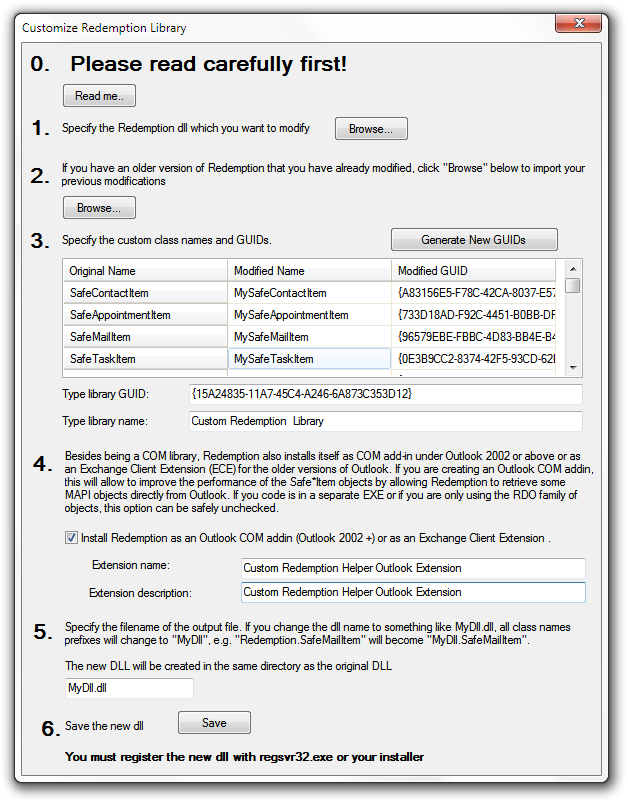
To use a custom version of Redemption, VB code must create objects with CreateObject() rather than New. The early-bound type can still be used at design time, but the runtime instance must be created from the modified ProgID.
This code hardcodes the original class GUID and will fail if the DLL or class name was customized:
Dim sItem As Redemption.SafeMailItem
Set sItem = New Redemption.SafeMailItem
Use the modified class name instead:
Dim sItem As Redemption.SafeMailItem
Set sItem = CreateObject("MyDll.MyMailItem")
For C++, use CoCreateInstance() with the modified class GUID or call CLSIDFromProgID() to obtain it, then call CoCreateInstance().
For C# or other .NET languages, create the object through the modified ProgID after generating the interop assembly:
Type t = Type.GetTypeFromProgID("MyDll.MyMailItem");
SafeMailItem sItem = (SafeMailItem)Activator.CreateInstance(t);
Redemption discards a 32 or 64 suffix for custom COM class names. For example, if the DLL is named MyDll32.dll, the class names still start with MyDll.*.
Registry-free COM
Registry-free COM lets Windows load COM objects from your application directory instead of looking up the COM library location in the registry. This is useful when your application ships Redemption privately and uses an application manifest.
See Microsoft documentation for Creating Registration-Free COM Objects and Simplify App Deployment with ClickOnce and Registration-Free COM.
Add the Redemption COM class entries to your application manifest. Registry-free COM can be combined with the other approaches above.
<?xml version="1.0" encoding="utf-8"?>
<assembly xsi:schemaLocation="urn:schemas-microsoft-com:asm.v1 assembly.adaptive.xsd"
  manifestVersion="1.0"
  xmlns:asmv1="urn:schemas-microsoft-com:asm.v1"
  xmlns:asmv2="urn:schemas-microsoft-com:asm.v2"
  xmlns:dsig="http://www.w3.org/2000/09/xmldsig#"
  xmlns="urn:schemas-microsoft-com:asm.v1"
  xmlns:xsi="http://www.w3.org/2001/XMLSchema-instance">
  <assemblyIdentity name="TestRegFreeRedemption.exe" version="1.0.0.0" type="win32" />

  <!-- Redemption specific entries. Copy them to your own manifest file. -->
  <file name="Redemption.dll">
    <comClass clsid="{4fd5c4d3-6c15-4ea0-9eb9-eee8fc74a91b}"
      threadingModel="Apartment" progid="Redemption.SafeContactItem" />
    <comClass clsid="{620d55b0-f2fb-464e-a278-b4308db1db2b}"
      threadingModel="Apartment" progid="Redemption.SafeAppointmentItem" />
    <comClass clsid="{741beefd-aec0-4aff-84af-4f61d15f5526}"
      threadingModel="Apartment" progid="Redemption.SafeMailItem" />
    <comClass clsid="{7a41359e-0407-470f-b3f7-7c6a0f7c449a}"
      threadingModel="Apartment" progid="Redemption.SafeTaskItem" />
    <comClass clsid="{c5aa36a1-8bd1-47e0-90f8-47e7239c6ea1}"
      threadingModel="Apartment" progid="Redemption.SafeJournalItem" />
    <comClass clsid="{fa2cbafb-f7b1-4f41-9b7a-73329a6c1cb7}"
      threadingModel="Apartment" progid="Redemption.SafeMeetingItem" />
    <comClass clsid="{11e2bc0c-5d4f-4e0c-b438-501ffe05a382}"
      threadingModel="Apartment" progid="Redemption.SafePostItem" />
    <comClass clsid="{4a5e947e-c407-4dcc-a0b5-5658e457153b}"
      threadingModel="Apartment" progid="Redemption.MAPIUtils" />
    <comClass clsid="{03c4c5f4-1893-444c-b8d8-002f0034da92}"
      threadingModel="Apartment" progid="Redemption.MAPIFolder" />
    <comClass clsid="{7ed1e9b1-cb57-4fa0-84e8-fae653fe8e6b}"
      threadingModel="Apartment" progid="Redemption.SafeCurrentUser" />
    <comClass clsid="{7c4a630a-de98-4e3e-8093-e8f5e159bb72}"
      threadingModel="Apartment" progid="Redemption.SafeDistList" />
    <comClass clsid="{37587889-fc28-4507-b6d3-8557305f7511}"
      threadingModel="Apartment" progid="Redemption.AddressLists" />
    <comClass clsid="{a6931b16-90fa-4d69-a49f-3abfa2c04060}"
      threadingModel="Apartment" progid="Redemption.MAPITable" />
    <comClass clsid="{d46ba7b2-899f-4f60-85c7-4df5713f6f18}"
      threadingModel="Apartment" progid="Redemption.SafeReportItem" />
    <comClass clsid="{ed323630-b4fd-4628-bc6a-d4cc44ae3f00}"
      threadingModel="Apartment" progid="Redemption.SafeInspector" />
    <comClass clsid="{29ab7a12-b531-450e-8f7a-ea94c2f3c05f}"
      threadingModel="Apartment" progid="Redemption.RDOSession" />
  </file>
</assembly>