Proxy Manager Version History
Release notes, fixes, and feature additions for Proxy Manager.
Latest public release: 4.0.0.1097, August 7, 2021.
Latest public release
Proxy Manager 4.0
- Proxy Manager no longer relies on Basic Authentication alone, which is deprecated by Microsoft, and now supports OAuth2 authentication with Office 365 hosted mailboxes. After registering Proxy Manager as an application in Azure Active Directory, Proxy Manager can function without Basic Authentication enabled in your organization. See the step-by-step instructions for using Proxy Manager with OAuth2 authentication in Microsoft Azure.
Previous release
Proxy Manager 3.3
- New feature: Proxy Manager now allows filtering SMTP addresses from being shown or used with include/exclude lists that support DOS-style wildcards * and ?. The lists can be defined in either HKLM, which affects all users, or HKCU. Both lists are semicolon-separated filters. See the how-to page for more information.
- New feature: Proxy Manager now shows the SMTP address the outgoing message was sent from, or the incoming message was sent to, in the Email Account column in Outlook if the column is visible in the folder view.

- Bug fix: For some Exchange Servers using NTLM authentication, no messages could be sent and no NDR was generated.
- Bug fix: On a received message, if both the primary user and one of its delegate mailboxes were present as recipients, Proxy Manager on a reply or forward could sometimes default to the delegate address instead of the matching address from the primary mailbox.
Previous release
Proxy Manager 3.2
- In a multiuser environment, such as RDS, options global to all users, including RegistrationKey, Timeout, and CanEditNames, can be set in HKLM rather than HKCU so the administrator can enter the keys once and have them used by all users on the machine.
- You can also set DefaultServer, DefaultPort, and DefaultEncryptionKind options used as the default template when a local user configures Proxy Manager for the first time.
Previous release
Proxy Manager 3.1
- Bug fix: Disabled addresses were still displayed in the From dropdown.
- Bug fix: Sending a message using Proxy Manager to a private Distribution List from one of the Contacts folders produced a non-delivery report: Could not retrieve an SMTP address.
- Bug fix: The Proxy Manager Options dialog was sometimes invisible, locking Outlook, if the Outlook main window was shown on a secondary monitor.
- The installer now includes both 32-bit and 64-bit versions; there are no more separate installers.
Older history
Older release
Proxy Manager 3.0
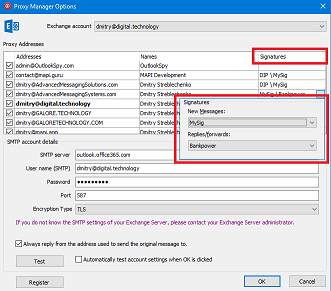
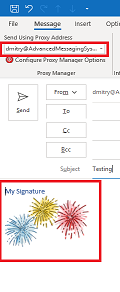
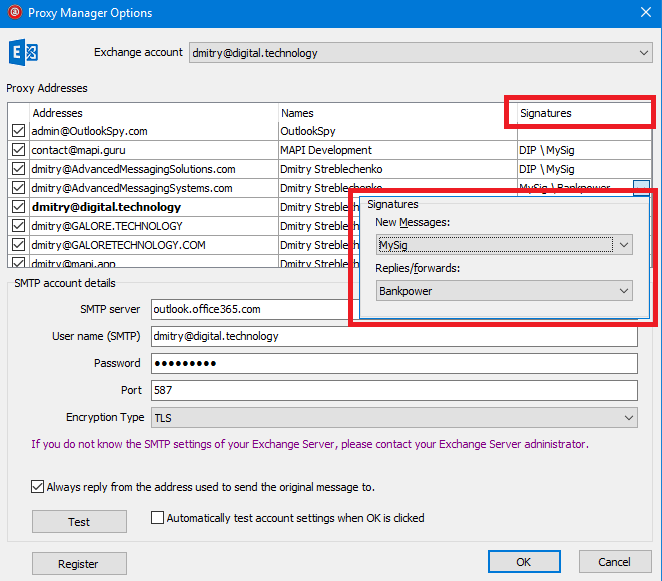
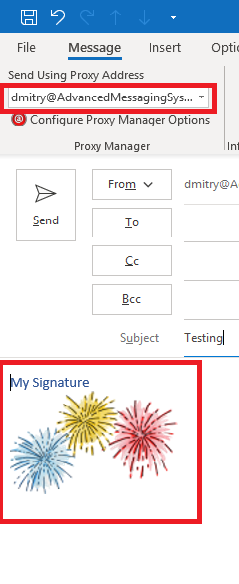
- New: Proxy Manager now supports per-email-address signatures. Whenever a new message or reply is created, the appropriate signature is selected. Selecting a different address with a signature inserts that signature, or replaces the old signature with the signature associated with that address.
Older release
Proxy Manager 2.8
- Bug fix: When replying or forwarding using an inline reply in Outlook 2016 January 2019 update, the reply would get sent, but it would also sometimes pop up in a separate inspector instead of just closing.
- Bug fix: Proxy Manager would sometimes fail to show its Options dialog box when clicking File | Proxy Manager Options in Outlook.
Older release
Proxy Manager 2.7
- Bug fix: It could take a long time for the Options dialog to appear on machines configured with invalid or slow DNS servers.
- Bug fix: If the Exchange account password was updated but Proxy Manager still used the old password, messages could be sent successfully, but a copy would be left in the Outbox folder.
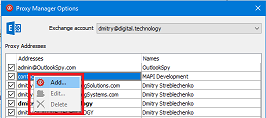
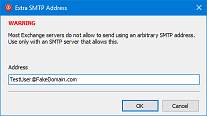
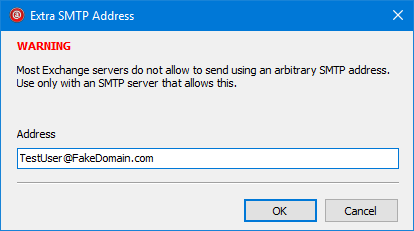
- New: Proxy Manager now allows adding arbitrary SMTP addresses. This feature only works with non-Exchange SMTP servers because Exchange Server does not allow sender address spoofing. Right-click on the address list to add an extra address.

Older release
Proxy Manager 2.6
This release focused primarily on performance and stability issues.
- New: Outlook 2019 is now fully supported.
- Stability fix: Sometimes Outlook reported that Proxy Manager was too slow to start up and disabled it.
- Bug fix: Voting options, if set, were lost if a message was sent by Proxy Manager.
Older release
Proxy Manager 2.5
This release focused primarily on performance and stability issues.
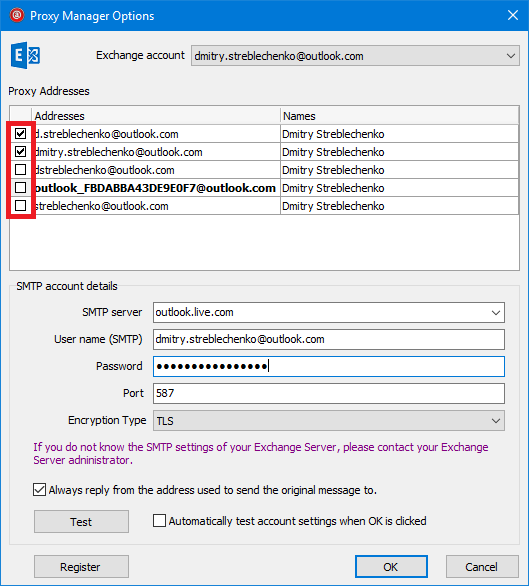
- New: Proxy Manager is now optimized to work with a large number of aliases, 100 or more, and is much faster even with smaller lists. Icons were removed from the address dropdown because of a GDI object leak in Outlook that can lead to an Outlook crash.
- New: On June 1, 2018, Microsoft turned on an Office 365 feature that causes all messages sent through SMTP to be automatically saved in the Sent Items folder. This causes duplicates if a message is sent using an older version of Proxy Manager.
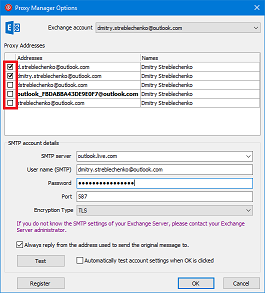
- New: You can now hide some proxy SMTP aliases from the address dropdown.
Older release
Proxy Manager 2.4
- New: Proxy Manager now automatically picks up and allows sending through the SMTP addresses of all delegate Exchange mailboxes on whose behalf the current user has the right to send messages, using Send on behalf permission on Exchange Server.
- Bug fix: Proxy Manager always saved the sent message in the default Sent Items folder instead of checking if the message was set by the user to be saved in a different folder.
- Bug fix: Proxy Manager could not connect to an SMTP server through DirectAccess or if the SMTP server was only accessible through IPv6.
- Bug fix: Proxy Manager sometimes caused Outlook to crash if it was manually disabled from File | Options | Addins in Outlook.
- Bug fix: In case of multiple mail accounts, Redemption did not sort email addresses based on account order, with the default account coming first.
Older release
Proxy Manager 2.3
- Proxy Manager now supports TLS 1.2. Microsoft planned to turn it on for Office 365 Exchange servers in March 2018, with older versions of TLS disabled.
- Sending a signed/encrypted message sometimes created an NDR with the IMessage.CopyTo: MAPI_E_CALL_FAILED error.
- Proxy Manager now keeps its credentials in sync with the credentials used by Outlook. If the Exchange account password changes, you do not need to enter the new password in Proxy Manager.
- Proxy Manager sometimes created a non-delivery report even if the message was successfully submitted when the SMTP server unexpectedly terminated the connection after the message was transmitted but before Proxy Manager attempted to log off.
- Proxy Manager now allows reclaiming the license key by deleting the license on a machine where it was previously installed through the Options | Register dialog box.
Older release
Proxy Manager 2.2
- Proxy Manager sometimes caused Outlook to hang on start up.
- When Outlook was in touch mode, sending an inline reply or forward through Proxy Manager left the inline editor open. Clicking Send the second time produced a The message was deleted error from Outlook.
- Proxy Manager returned an authentication error under certain conditions.
- Proxy Manager could not handle NT-style user names in domain\user format.
- Proxy Manager sometimes displayed an error message when a new Reply or Forward window was opened.
- Proxy Manager now pre-populates SMTP server name for outlook.com accounts.
Older release
Proxy Manager 2.1
- Added support for Outlook 2016.
- Proxy Manager now supports Danish language.
- By default, Proxy Manager always defaults the reply address to the proxy address to which the original message being replied to was sent. A new option was added to the Proxy Manager Options dialog box: Always reply from the original address used to send the original message to. Unchecking that option forces Proxy Manager to default to the primary SMTP address of the Exchange account unless another address is selected.
- Editing of the display names associated with proxy addresses by the end user can now be prevented by creating a DWORD registry value named CanEditNames with the value 0 in HKEY_CURRENT_USER\Software\AdvancedMessagingSystems\ProxyMan.
- Proxy Manager no longer requires specifying the SMTP user name. If your server performs authentication based on IP address, you can leave the user name edit box empty and Proxy Manager will skip SMTP authentication.
Older release
Proxy Manager 2.0
- Proxy Manager now supports German, Spanish, French, Dutch, Italian, Portuguese, and Russian languages. The language is automatically selected on Outlook startup based on the Microsoft Office UI language specified by the OfficeUILanguage registry value in HKCU\Software\Microsoft\Shared.
- You can now specify the SMTP connection timeout, 10 seconds by default, when using a high-latency connection. Create a Timeout value, either string or DWORD, in HKEY_CURRENT_USER\Software\AdvancedMessagingSystems\ProxyMan. The value is in milliseconds; for example, 60000 sets a 60 second timeout.
Older release
Proxy Manager 1.0.0.139
- Proxy Manager sometimes showed no proxy addresses in the Options dialog box.
- Proxy Manager caused messages to be sent as the primary mailbox owner if a delegate user, not in the list of proxy addresses, was selected from the Proxy Manager address dropdown.
Older release
Proxy Manager 1.0.0.21
- Proxy Manager attempted to send the message when a delegate, not a proxy address, was selected, resulting in the DATA command: 550 5.7.1 Client does not have permissions to send as this sender error.
Older release
Proxy Manager 1.0.0.19
- Sometimes when sending to an internal Exchange recipient, the message either was not sent to that mailbox or an NDR was generated with the error code The message has no recipients.
Older release
Proxy Manager 1.0.0.13
- Proxy Manager did not list POP3/SMTP and IMAP4/SMTP accounts in its ribbon dropdown.
- Messages sent through the default Exchange SMTP address, not handled by Proxy Manager, sometimes caused NDRs on replies due to an invalid sender SMTP address, for example IMCEAEX-dmitry+40digital+2Etechnology@namprd11.prod.outlook.com.
Initial release
Proxy Manager 1.0.0.6
- First version of Proxy Manager was released.